Claude computer use with its own cursor
Omarchy Computer Use gives Claude — or any MCP-capable agent — a desktop of its own on Omarchy and Hyprland: a nested Hyprland session that shows up as a single window with an orange frame. The agent gets its own cursor, its own keyboard focus and its own windows. Your mouse and keyboard are never touched.
STATUS: PRE-ALPHA (v0.2) · NOT AFFILIATED WITH ANTHROPIC, OMARCHY OR HYPRLAND
A desktop for the agent, in one window
01Classic computer use takes over your screen: the agent moves your mouse, types into your window, and you watch until it's done.
Here the nested compositor runs on Hyprland's Wayland backend, so it is an ordinary window on your desktop. Pointer and keyboard events go to the nested compositor's socket and never reach your session. You keep working while the agent clicks around.
Hide the window and it parks on a hidden workspace; with render_unfocused it keeps rendering, so screenshots keep working in the background.
your Hyprland session
└── window "aquamarine"  (orange frame, 1280×800)
    └── nested Hyprland  ← own seat, cursor, windows
        ├── virtual pointer   (zwlr_virtual_pointer_v1)
        ├── virtual keyboard  (wtype)
        └── screenshots       (grim)
What it does
02Your input stays yours
The agent drives a separate Wayland seat with its own cursor — an orange arrow with a name tag — not your pointer.
Live preview next to the chat
Inside Herdr, a preview docks next to the agent's chat the moment its desktop starts, with buttons to take over, show, stop or close. Any other terminal: agentdesk watch.
Take over any time
One click and the frame turns blue: your mouse, keyboard and clipboard work inside, the agent waits. It can also hand over by itself, e.g. for a login.
Roles per agent
Decide per agent what it may do: only look, click and type, open URLs from an allowlist, launch apps, stop the desktop.
Real computer use
Clicks, drags, scrolls, types (including Unicode), presses shortcuts — and moves, resizes, maximizes and closes windows.
Watch or ignore it
Show the desktop over your current workspace, or park it off-screen. It keeps rendering while hidden.
Its own apps
Browsers get a separate profile and apps their own D-Bus session, so nothing the agent opens lands on your desktop.
No build step
Plain Python stdlib plus tools Omarchy already ships: grim, wtype, wl-clipboard.
Take over and hand back
03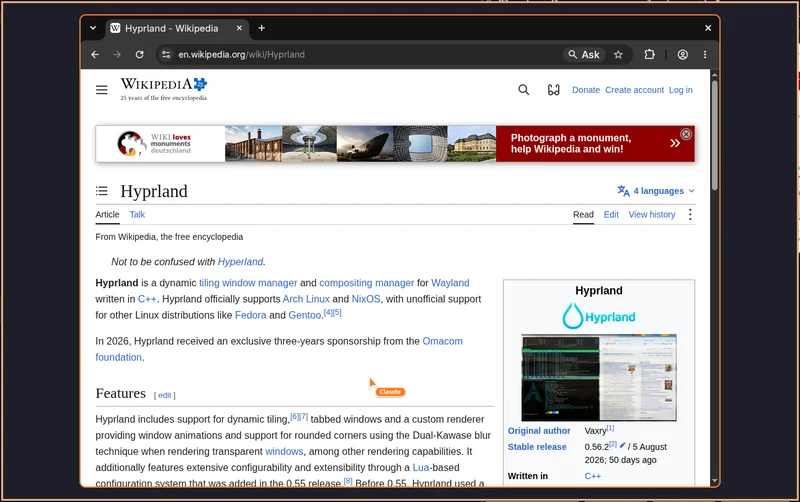
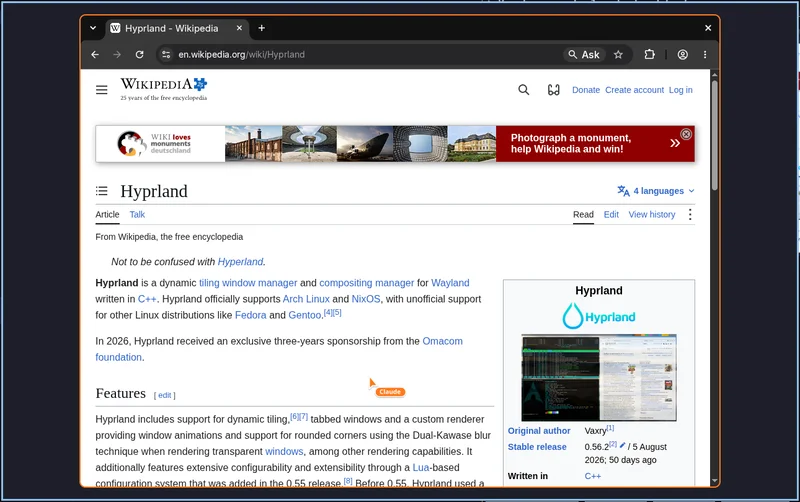
Take over from the bar icon (right click), with t in the preview, or with agentdesk takeover. After a takeover the agent's input is blocked until you hand back.
The sandbox has a clipboard of its own. While you have control it is shared with yours in both directions, so you can paste a password from your password manager into a login form. When you hand back, sharing stops and the sandbox clipboard is emptied. The agent never sees what you copy.
Install
04- 01Hyprland 0.56 or newer with a Lua config — Omarchy 4 ships this.
- 02
python3(3.9+),grim,wtype,wl-clipboard. - 03Optional:
rsvg-convertto recolour or rename the cursor, anddbus-run-sessionto isolate sandbox apps from your session bus. - 04
agentdesk doctorchecks that everything is there.
Other MCP clients like Codex or opencode use the same command: python3 /path/to/omarchy-computer-use/bin/agentdesk mcp.
$ claude plugin marketplace add enricofranke/omarchy-computer-use
$ claude plugin install omarchy-computer-use@omarchy-computer-use
$ git clone https://github.com/enricofranke/omarchy-computer-use ~/.local/share/omarchy-computer-use
$ claude mcp add agentdesk -- python3 ~/.local/share/omarchy-computer-use/bin/agentdesk mcp
$ omarchy plugin add https://github.com/enricofranke/omarchy-computer-use.git --enable --yes
The plugin installs the MCP server and a computer-use skill that teaches Claude the workflow. Bar widget: left click shows or hides the desktop, right click takes over, middle click stops it.
MCP tools
05| TOOL | WHAT IT DOES |
|---|---|
| computer | screenshot, clicks (left, right, middle, double, triple), mouse_move, left_click_drag, scroll, type, key, wait, zoom and more — mirroring Anthropic's computer-use tool. Every action returns a fresh screenshot. |
| open | Open a URL in the sandbox browser or launch any command inside the sandbox |
| windows | list, focus, move, resize, maximize, center, fullscreen, close |
| desktop | status, start, stop, restart, show, hide, handover, reclaim, preview |
The desktop starts on first use. Everything is also available from the agentdesk command line; settings via agentdesk config set or environment variables.
Roles: what an agent may do
06| ROLE | MAY |
|---|---|
| admin | everything (default) |
| operator | everything except launching commands |
| viewer | screenshots, window list and status only |
Custom roles are built from permissions (screen, mouse, keyboard, open.url, open.command, desktop.* …) and can limit which URLs and programs open may start. Tools outside the role are not even offered to the agent.
$ agentdesk role assign claude-code operator
$ agentdesk role assign 'codex*' viewer
$ agentdesk role set tester --from operator \
    --urls 'https://staging.example.com/*' --commands nautilus
$ agentdesk role deny tester desktop.stop windows.close
What it is — and what it isn't
07Omarchy Computer Use isolates input and display. It is not a security sandbox: apps inside run as your user and can read and write your files. The sandbox browser profile starts empty, so the agent is not logged in anywhere unless you log in for it.
Roles limit what the agent can do through the MCP tools. They are guardrails, not a security boundary: an agent that also has a shell as your user — like Claude Code with its Bash tool — can edit the config or run agentdesk directly. For hard limits, take away the shell access too.
FAQ
08Does Omarchy Computer Use only work with Claude?
No. Any MCP client can use the server, for example Codex or opencode. The actions of the computer tool mirror Anthropic's computer-use tool, and Claude Code also gets a skill for the workflow.
Do I need Omarchy?
You need Hyprland 0.56 or newer with a Lua config; Omarchy 4 ships this. Plus python3 3.9+, grim, wtype and wl-clipboard. agentdesk doctor checks everything.
Can I keep working while the agent clicks around?
Yes. The agent drives a separate Wayland seat with its own cursor inside a nested Hyprland session. Your mouse and keyboard are never touched. Hide the window and it keeps working in the background.
What about logins and passwords?
Take over with one click and the frame turns blue. While you have control the clipboard is shared, so you can paste a password from your password manager. When you hand back, the sandbox clipboard is emptied. The agent can also hand over to you by itself when it hits a login.
Is it a security sandbox?
No. It isolates input and display. Apps inside run as your user and can read and write your files. Roles limit the MCP tools but are not a security boundary.
How stable is it?
It is pre-alpha (version 0.2). The core works, but commands, config keys and MCP tools may still change, and some corners are rough. If something breaks: open an issue on GitHub; logs are in $XDG_RUNTIME_DIR/agentdesk/hyprland.log.
Try it and send feedback
At this early stage every issue helps: what doesn't start, which window won't close, which action is missing. For anything else: [email protected].
Omarchy Computer Use is an independent project, not affiliated with Anthropic, Omarchy or Hyprland. "Claude" is a trademark of Anthropic. MIT licensed.